> For the complete documentation index, see [llms.txt](https://aisuko.gitbook.io/wiki/llms.txt). Markdown versions of documentation pages are available by appending `.md` to page URLs; this page is available as [Markdown](https://aisuko.gitbook.io/wiki/ai-techniques/stable-diffusion/diffusion-in-image.md).

# Diffusion in image

## Diffusion model

{% hint style="info" %}
Its math looks very much like diffusion in physics, so it was called diffusion model.
{% endhint %}

Stable Diffusion is a text-to-image latent diffusion model. It is called a latent diffusion model because it works with a lower-dimensinal representation of the image instead of the actual pixel space, which makes it more memory efficient.

The encoder compresses the image into a smaller representation, and a decoder to convert the compresses representation back into an image.

For text-to-image models, you'll need a tokenizer and an encoder to generate text embeddings.

### What can Stable Diffusion do?

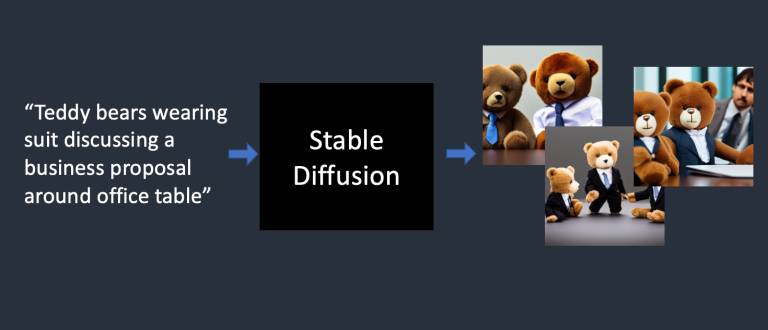
Stable Diffusion is a text-to-image deep-learning model.

<figure><img src="/files/F5d6ErkUYGT6vNTJLCOs" alt=""><figcaption><p>Stable diffusion turns text prompts into images</p></figcaption></figure>

## Training part

### Foward diffusion

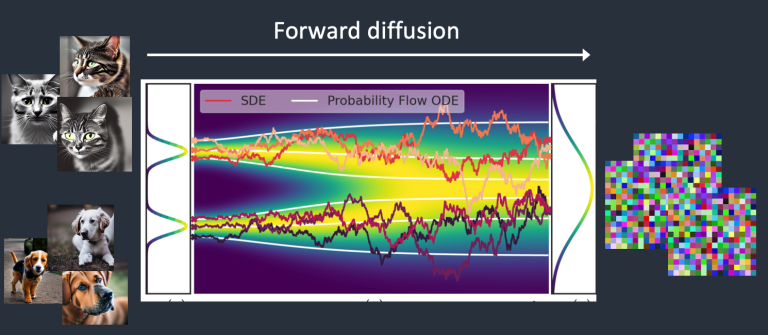
<figure><img src="/files/GUi4uiAKFtlCyplmfmV5" alt=""><figcaption><p>Forward diffusion turns a <a href="https://arxiv.org/abs/2011.13456">photo </a>into noise.</p></figcaption></figure>

A <mark style="color:red;">**forward diffusion**</mark> process adds noise to a training image, gradually turning it into an uncharacteristic noise image. The forward process will run any cat or dog image into a noise image. *<mark style="color:red;">**Eventually, you won't be able to tell whether they are initially a dog or a cat.**</mark>*

It's like a drop of ink fell into a glass of water. The ink drop diffuses in water. After a few minutes, it randomly distributes itself throughout the water. You can no longer tell whether it initially fell at the center or near the rim.

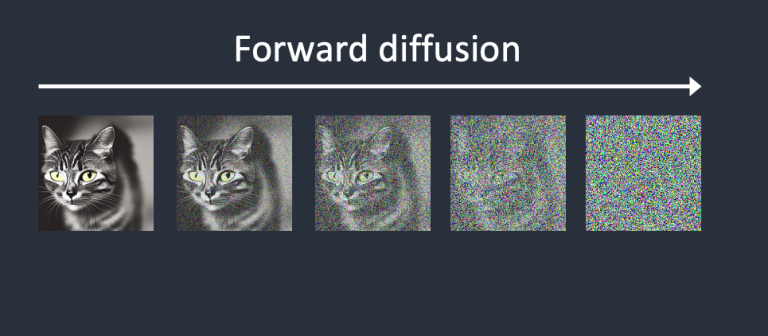
Example of forward diffusion of a cat image

<figure><img src="/files/WgnyBtcbBzJmvU7OLc4H" alt=""><figcaption><p>Forward diffusion of a cat image</p></figcaption></figure>

### Reverse diffusion

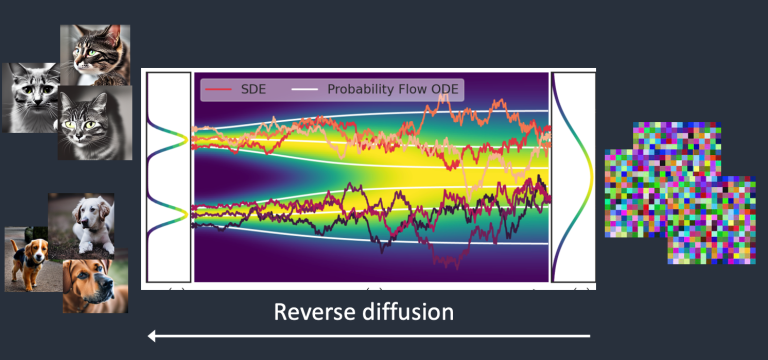
<figure><img src="/files/R6kjVGMvqauixfaWNWOn" alt=""><figcaption><p>The reverse diffusion process recovers an image.</p></figcaption></figure>

*<mark style="color:red;">**The main idea of reverse diffusion**</mark>* is starting from a noisy, meaningless image, it recovers a cat OR a dog image.

Reverse diffusion in latent space please see [here](/wiki/ai-techniques/stable-diffusion/stable-diffusion-model.md#reverse-diffusion-in-latent-space).

### Summary for diffusion process

Every diffusion process has two parts below

* Drift or directed motion
* Random motion

And the *<mark style="color:blue;">**reverse diffusion towards either cat or dog images but nothing in between**</mark>*. That's why the result can either be a cat or a dog.

## How training is done

{% hint style="info" %}
I agree this is a million-dollar question.
{% endhint %}

To reverse the discussion, we need to know how much noise is added to an image. The answer is using [noise predictor.](#noise-predictor)

### Noise predictor

*<mark style="color:red;">**A neural network model to predict the noise added. And it is a**</mark>* [*<mark style="color:red;">**U-Net model**</mark>*](https://en.wikipedia.org/wiki/U-Net)*<mark style="color:red;">**.**</mark>*

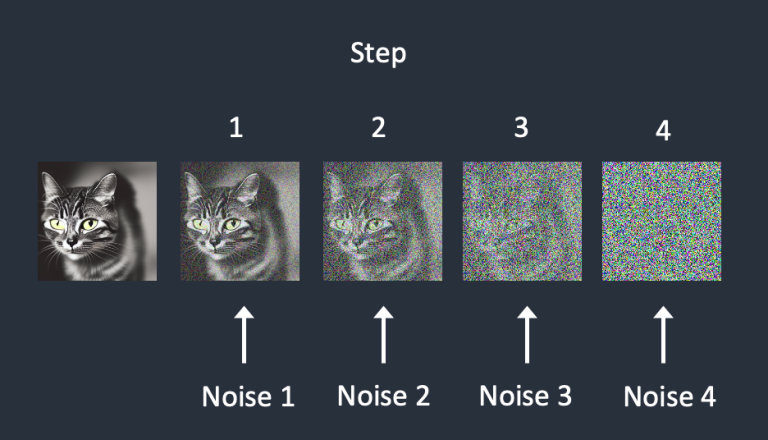
Here is the training process for the **noise predictor** below:

1. Pick a training image, like a photo of a cat.
2. Generate a random noise image
3. Corrupt the training image by adding this noisy image up to a certain number of steps
4. Teach <mark style="color:red;">**the noise predictor**</mark> to tell us how much noise was added. This is done by tuning its weights and showing it the correct answer.

<figure><img src="/files/TRLw7AtFcL2djemvej0C" alt=""><figcaption></figcaption></figure>

In the above picture, noise is sequentially added at each step. The noise predictor estimates the total noise added up to each step.

After training, **we have a noise predictor capable of estimating the noise added to an image.**

### Noise predictor in [reverse diffusion](#reverse-diffusion)

1. Generating a completely random image and ask the noise predictor to tell us the noise
2. Subtracting this estimated noise from the original image
3. Repeat this process a few times

We will get an image of either a cat or a dog.

{% hint style="info" %}
Here is no control over generating a cat or a dog's image(unconditioned). More detail for [conditioning](/wiki/ai-techniques/stable-diffusion/conditioning.md)
{% endhint %}

<figure><img src="/files/lU3UebCgZIRDY3ESeoYp" alt=""><figcaption><p>Reverse diffusion works by subtracting the predicted noise from the image successively</p></figcaption></figure>

## Credit

{% embed url="<https://stable-diffusion-art.com/how-stable-diffusion-work/#Diffusion_model>" %}


---

# Agent Instructions
This documentation is published with GitBook. GitBook is the documentation platform designed so that both humans and AI agents can read, navigate, and reason over technical content effectively. Learn more at gitbook.com.

## Querying This Documentation
If you need additional information that is not directly available in this page, you can query the documentation dynamically by asking a question.

Perform an HTTP GET request on the current page URL with the `ask` query parameter, and the optional `goal` query parameter:

```
GET https://aisuko.gitbook.io/wiki/ai-techniques/stable-diffusion/diffusion-in-image.md?ask=<question>&goal=<endgoal>
```

`ask` is the immediate question: it should be specific, self-contained, and written in natural language.
`goal` is optional and describes the broader end goal you are ultimately trying to accomplish on behalf of the user. GitBook uses it to tailor the answer towards what is most useful for that goal.

The response will contain a direct answer to the question and relevant excerpts and sources from the documentation.

Use this mechanism when the answer is not explicitly present in the current page, you need clarification or additional context, or you want to retrieve related documentation sections.