> For the complete documentation index, see [llms.txt](https://aisuko.gitbook.io/wiki/llms.txt). Markdown versions of documentation pages are available by appending `.md` to page URLs; this page is available as [Markdown](https://aisuko.gitbook.io/wiki/ai-techniques/stable-diffusion/depth-maps.md).
# Depth maps
Depth to image
Overview
Depth-to-image (Depth2img) is an under-appreciated model in Stable Diffusion v2. ***It is an enhancement to image-to-image (img2img)*** which takes advantage of the depth information when generating new images.
***With depth-to-image, you have better control of synthesizing subject and background separately.***
In depth-to-image, Stable Diffusion takes an image and a prompt as inputs (similar with image-to-image). The model first estimates the depth map of the input image using [MIDas](https://github.com/isl-org/MiDaS), ***an AI model developed in 2019 for estimating*** [***monocular depth perception***](https://en.wikipedia.org/wiki/Depth_perception) ***(that is estimating depth from a single view).*** The depth map is then used by Stable Diffusion as an extra [**conditioning** ](/wiki/ai-techniques/stable-diffusion/conditioning.md)to image generation.
Depth-to-image uses three conditionings to generate a new image
* test prompt
* original image
* depth map
Equipped with the depth map, the model has *some* knowledge of the three-dimensional composition of the scene. **Image generations of foreground objects and the background can be separated.**
## Depth map
***A depth map is a simple gray scale image of the same size of the original image encoding the depth information.**** ****Complete white means the object is closest to you. More black means further away.***
Here’s an example of an image and its depth map estimated by MIDaS.

## What can depth-to-image do
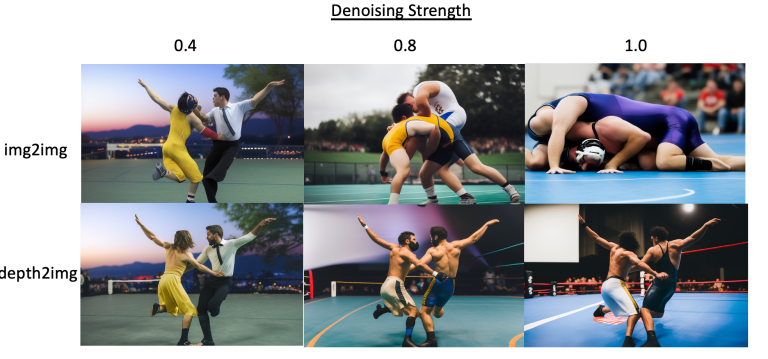
Here is an example of denoising strength for both image-to-image and depth-to-image.
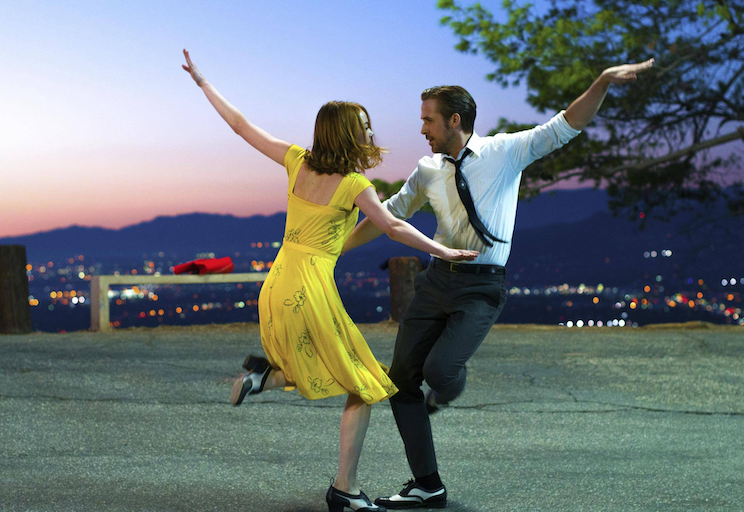
Original image
Comparing image-to-image and depth-to-image.
Here we can see the image-to-image generations (top row). We ran into a problem: at low denoising strength, the image didn't change enough. At high denoising strength, we do see two wrestlers but the original composition is lost.
***Depth-to-image resolves this problem.*** You can crank up denoising strength all the way to 1 (the maximum) without losing the original composition.
## Some useful points with depth image
### Inpainting
If we care about preserving the original composition

### Style transfer
We can dial denoising strength all the way up to 1 without losing composition. That makes transforming a scene to a different style easy.

## Summary
Depth-to-image is a great alternative to image-to-image, especially when you want to preserve the composition of the scene.
## Credit
{% embed url="" %}